
Energy reimbursement at the purchase tariff
Overview
The Reimbursement at purchase tariff feature makes it possible to reimburse the energy consumed by charging sessions based on the actual energy contract between the electricity supplier and the site host.
Until now, reimbursement was done at a fixed rate per kWh (AC or DC). This mode remains available, but the purchase tariff offers a fairer alternative: the reimbursement reflects exactly the price the host pays to its supplier, time slot by time slot.
Result: each month the host receives a transparent credit note, detailed by session and by tariff slot, aligned with its supplier contract.
Key concepts
Third-party energy contract
The third-party energy contract is the document that describes the tariff grid of the electricity supplier (EDF, Engie, etc.) applicable to a charging site. It contains:
- The supplier and the customer (host)
- The reference of the supplier contract
- The validity dates (start / end)
- The tariff structure organized into periods, day types and time slots
Tariff structure: 3 levels
The tariff grid of an energy contract is organized into 3 hierarchical levels:
| Level | Description | Example |
|---|---|---|
| Period | Seasonal breakdown with start and end dates | Winter (Nov 1 → Feb 28), Summer (Mar 1 → Oct 31) |
| Day type | Recurrence rule within a period | Every day, Working days, Weekend, Exceptional dates |
| Time slot | Time range with a price per kWh | 06:00–22:00 Peak Hours €0.1540/kWh |
Day-type resolution priority
When several day types apply to the same date, the system applies this order of priority:
- Exceptional dates (red days of the supplier contract, e.g. days of high demand on the grid) — highest priority
- Specific days (working days, weekend)
- Every day — default rule
Example: January 15 is a Wednesday (working day), but it is flagged as a red day in the supplier contract. If an exceptional date is defined for 01/15, its specific tariff applies, and not the working-days one.
Workflow
Step 1 — Create the third-party energy contract
From the Contracts > Energy contracts menu, create a new contract by entering:
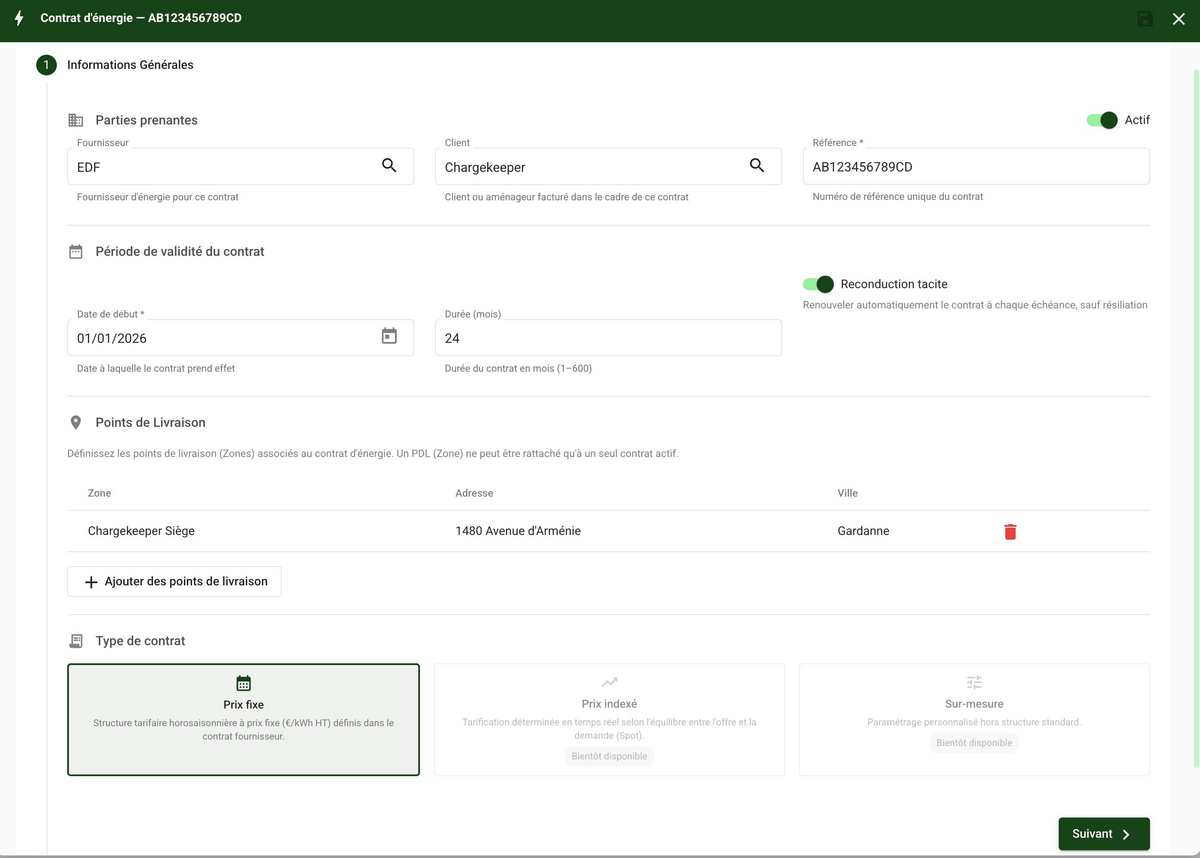
- General information: supplier, host (customer), contract reference, validity dates, contract type (fixed)
- Tariff periods: define the seasonal periods (e.g. Winter, Summer) with their dates
- Day types and time slots: for each period, configure the time slots with their prices per kWh
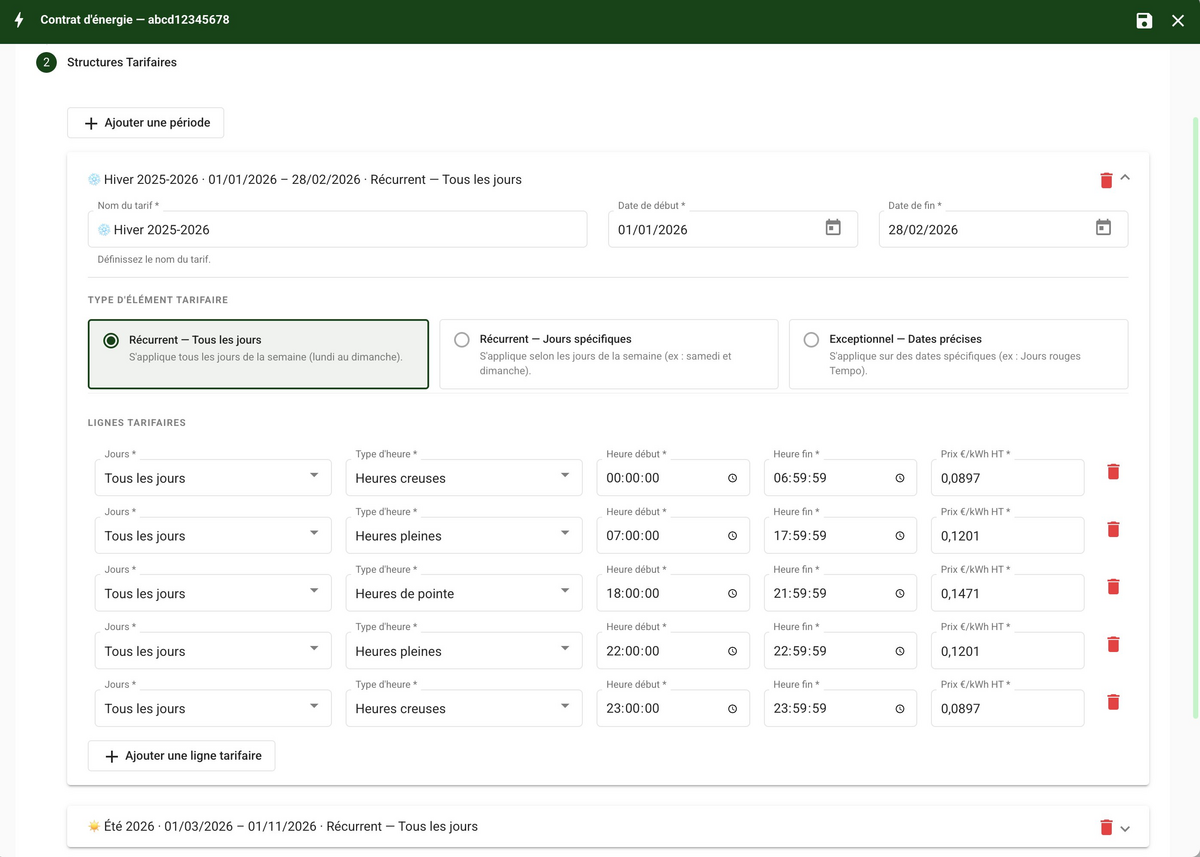
The form automatically validates the consistency of the entry:
- No overlap between periods
- No gap in the 24h coverage of the time slots
- No duplicate on exceptional dates
- Consistency between day types (no "Every day" + "Specific days" conflict on the same period)
Step 2 — Associate with the B2B contract
In the host's B2B contract, at the Transaction > Energy reimbursement step:
- Enable the energy reimbursement service
- Select the Purchase tariff mode
- Choose the third-party energy contract to associate
The system will automatically use this contract to calculate the reimbursement of all charging sessions on this host's sites.
Step 3 — Automatic billing
At each monthly due date, the system:
- Retrieves all the month's sessions for this host
- For each session, applies the tariff grid of the energy contract
- Generates a credit note with the breakdown by slot
- Sends by email the PDF invoice and the detailed Excel export
How the reimbursement is calculated
General principle
For each charging session, the system:
- Identifies the time boundaries crossed by the session: time-slot changes, midnight crossings, tariff-period transitions
- Splits the session into segments at each boundary
- Distributes the consumed energy across each segment proportionally to the meter readings (OCPP meter values)
- Applies the tariff corresponding to each segment according to the energy contract
- Calculates the amount of each segment:
kWh × price €/kWh
The total reimbursement is the sum of all segments.
Concrete example
Context: an overnight charging session on a site whose energy contract provides for three tariff slots:
| Slot | Time range | Price |
|---|---|---|
| Peak Hours (HP) | 06:00 – 22:00 | €0.154/kWh |
| Off-Peak evening (HC evening) | 22:00 – 00:00 | €0.1064/kWh |
| Off-Peak night (HC night) | 00:00 – 06:00 | €0.0864/kWh |
Session: from 02/21 at 23:30 to 02/22 at 11:52 — total consumption: 54,494 Wh
The charge point transmits regular meter readings during the charge. The system therefore has several intermediate measurement points:
| Timestamp | Cumulative energy |
|---|---|
| 23:30 (start) | 0 Wh |
| 23:55 | 4,743 Wh |
| 00:00 | 5,696 Wh |
| 06:00 | 54,492 Wh |
| 11:52 (end) | 54,494 Wh |
The session crosses two tariff boundaries: the midnight crossing (HC evening → HC night) and the 06:00 crossing (HC night → HP). Thanks to the intermediate readings close to these boundaries, the system can distribute the energy precisely — by interpolation between the readings closest to each boundary, and not by simple uniform distribution.
Splitting and calculation:
| Segment | Range | Slot | Energy | Unit price | Amount |
|---|---|---|---|---|---|
| 1 | 23:30 → 00:00 | HC evening | 5,639 Wh | €0.1064/kWh | €0.60 |
| 2 | 00:00 → 06:00 | HC night | 48,853 Wh | €0.0864/kWh | €4.22 |
| 3 | 06:00 → 11:52 | HP | 2 Wh | €0.154/kWh | €0.00 |
| Total | 54,494 Wh | €4.82 |
Session 23:30 ──────────────────────────────────────────── 11:52
               │           │                    │
            HC evening   HC night              HP
          23:30→00:00  00:00→06:00          06:00→11:52
           5,639 Wh    48,853 Wh               2 Wh
          × €0.1064   × €0.0864          × €0.154
          = €0.60     = €4.22             = €0.00
               │           │                    │
               └───────────┴────────────────────┘
                        Total = €4.82
We can see that almost all the energy was consumed during the night (HC night), at the most advantageous tariff. The sum of the segments is always equal to the total consumption of the session — no energy is lost in the splitting.
Note: when the charge point transmits only the start and end readings of the session (no intermediate reading), the system distributes the energy pro rata to the time spent in each slot.
Fallback behavior
If the energy contract does not cover a session (expired contract, missing period, inactive contract), the system automatically applies the fixed AC/DC tariff defined in the B2B contract. There is never a session without reimbursement.
The detailed invoice (Excel export)
Each month the host receives an Excel export attached to its invoice. This export details each charging session line by line.
Format
- A simple session (a single time slot crossed) = 1 line
- A multi-slot session (crossing several time slots or midnight) = several lines, grouped by session identifier
For multi-line sessions, each line contains the same complete information (session metadata + tariff-segment data), which makes the file easier to read and process.
Key columns
| Column | Description |
|---|---|
| Transaction ID | Unique identifier of the session |
| Site | Name of the charging site |
| Charge point | Identifier of the charge point |
| Start / End | Start and end dates of the session |
| Consumption (Wh) | Energy of the segment |
| Reimbursed price (€/kWh) | Tariff applied to the segment |
Important rules
Locking of tariff periods
The locking of a tariff period of the energy contract depends on the status of the associated credit note:
- Open or draft credit note: the tariff period remains editable. If the credit note is cancelled, the contract can be corrected and billing restarted.
- Paid credit note: the tariff period becomes locked in read-only. This guarantees consistency between the billed amounts and the tariff grid used for the calculation.
Future periods (not yet used in a credit note) always remain editable.
Daylight saving time handling (summer time / winter time)
All sessions are recorded in UTC. The system automatically converts to local time (Europe/Paris) to determine the applicable tariff slot. Summer-time and winter-time transitions are handled natively — no manual intervention is required.
Frequently asked questions
Can I have several active energy contracts?
Yes, you can create one contract per host and per supplier. Each B2B contract can be associated with a different energy contract.
What happens if the energy contract expires mid-month?
Sessions covered by the contract are reimbursed at the purchase tariff. Sessions outside coverage automatically switch to the fixed AC/DC tariff of the B2B contract.
Can I modify an ongoing energy contract?
You can modify the tariff periods as long as the associated credit note has not moved to the "Paid" status. Once the credit note is paid, the period is locked. If a credit note is still open or cancelled, the contract remains editable.
Are very short sessions (a few minutes) also split?
Yes, the same algorithm applies regardless of the duration. A 10-minute session that does not cross any tariff boundary will simply produce a single line in the export.
How are network outages during a session handled?
If intermediate meter readings are missing (loss of charger connectivity), the energy is distributed uniformly over the period without readings. The calculation remains reliable — the total consumption is always correct.
What types of supplier contracts are supported?
The current version supports fixed-tariff contracts (prices defined per time slot). Indexed contracts (variable price based on a market index) and custom contracts are planned for a later version.
