
Tariffs
In Chargekeeper, no charging session is possible without a tariff, even a free one.
The tariff is the element that defines who can charge, where and under what conditions.
A tariff allows you to:
- authorize access to charging (authorized Zones & Groups),
- define the price of charging (or its free-of-charge status),
The tariff is the outcome and the link between groups and zones.
Create a tariff
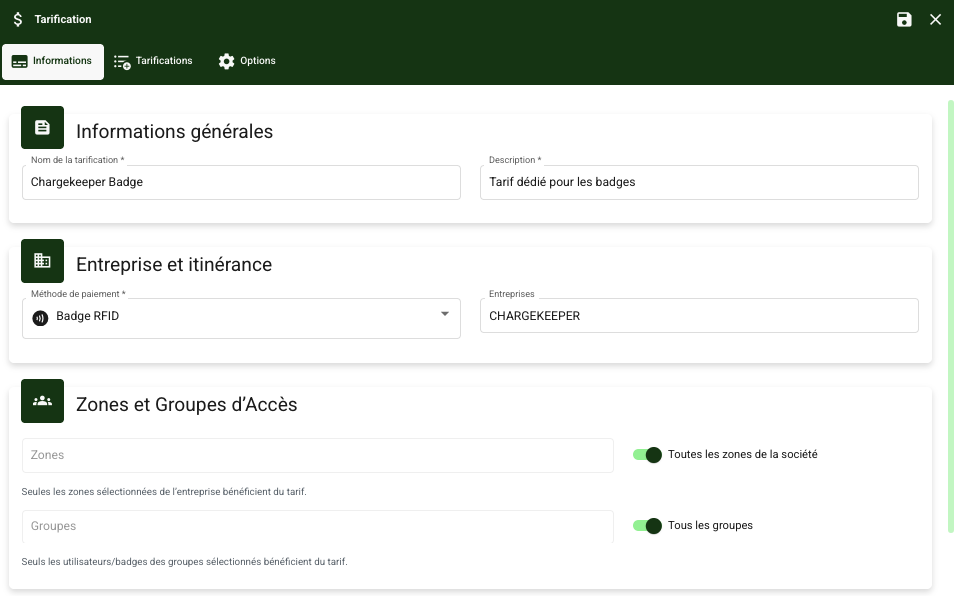
General information
Each tariff has general information that defines its usage and its basic parameters.
- Tariff name: Give each tariff a unique and descriptive name. This makes it easy to identify in the tariff lists.
- Description: You can add a detailed description of the tariff to specify its usage (for example, "Tariff reserved for company X vehicles").
- Company: Select the company or companies to which this tariff is assigned.
- Payment method: You can choose the payment methods available for this tariff (local payment or roaming).
Zones and Groups
Tariffs can be applied to specific zones and to user groups.
- Zones: You can restrict the application of the tariff to certain zones. For example, only the charging stations located in a specific zone (such as a car park) can be subject to a particular tariff.
- Groups: Tariffs can be restricted to certain user groups. This means that only the people belonging to these groups will be able to benefit from the defined tariff. For example, you can create a tariff for employees or for a specific vehicle fleet.
Pricing dimensions
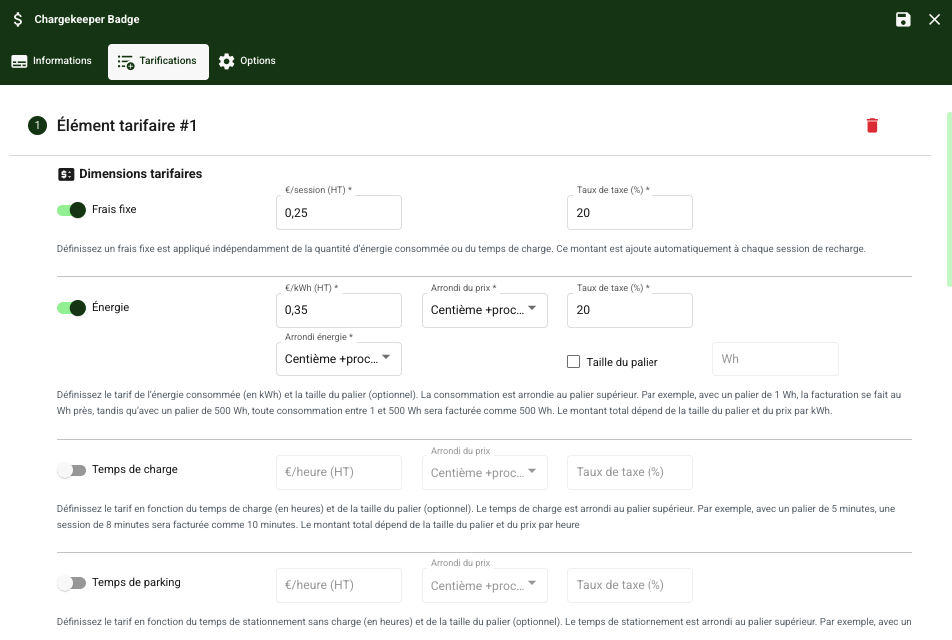
The pricing dimensions allow you to define the specific elements that will influence the cost for the user.
Available parameters:
- Flat fee: You can define a fixed cost per charging session, regardless of the duration or the energy consumed.
- Energy: This parameter allows you to bill users based on the energy consumed (€/kWh).
- Charging time: You can bill based on the length of time the charging station was used for charging (€/hour).
- Parking time: This parameter allows you to bill the user if they leave their vehicle parked without charging, beyond a certain time limit.
Additional pricing adjustments:
- Price rounding: You can choose to specify a rounding for each tariff type (hundredth or thousandth).
- Tax rate: Define the VAT rate or other taxes applicable to this tariff.
Pricing Restrictions
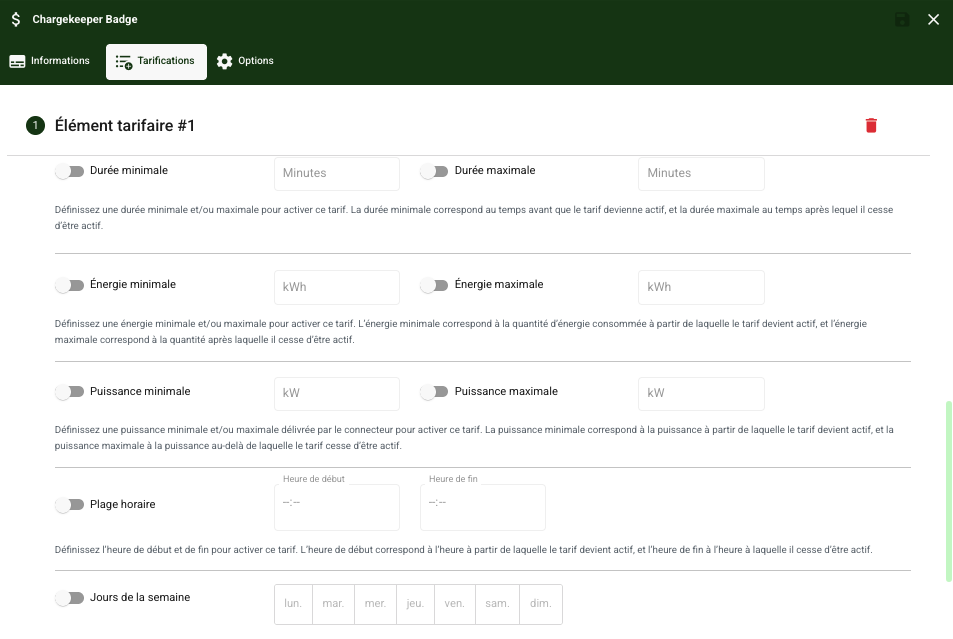
You can also restrict the application of tariffs based on different criteria to adjust the conditions for accessing charging.
Restriction parameters:
- Minimum and maximum duration: You can define a minimum or maximum charging duration for the tariff to apply (for example, a tariff can be applied only if the session lasts more than 30 minutes).
- Minimum and maximum energy: You can define a minimum and maximum energy consumption in kWh for the tariff to apply.
- Time slots: You can restrict tariffs to certain hours of the day. For example, you can define a specific tariff during off-peak hours.
- Days of the week: Tariffs can be configured to apply only on certain days of the week (for example, a reduced tariff for weekends).
Pricing Options
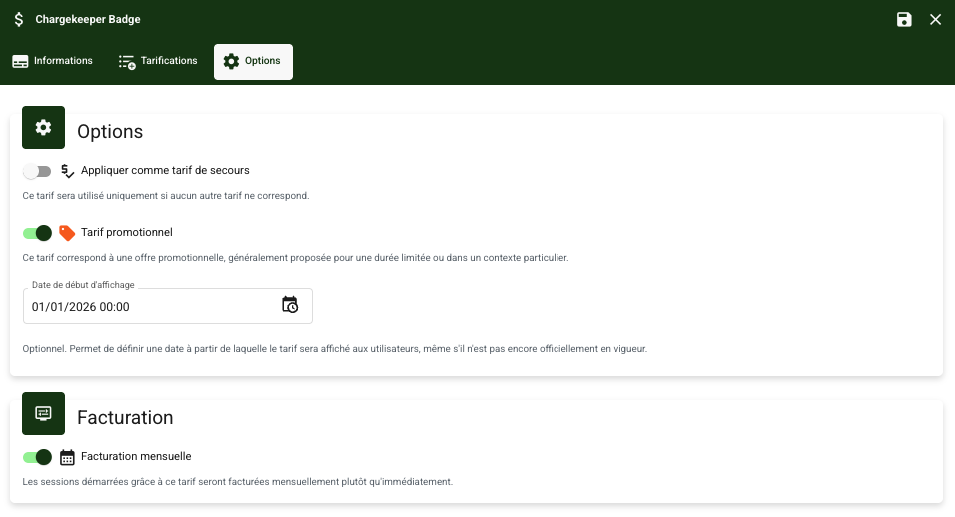
- Apply as fallback tariff: You can enable this so that it applies by default if no other tariff matches.
- Promotional tariff: You can flag this tariff as promotional; it will then be highlighted by a dedicated icon in the app. You can also enable a display start date earlier than the tariff start date to showcase it to users.
- Monthly billing: Users authorized to charge with this option on the tariff will benefit from monthly billing, with a charge to their bank card on the 5th day of each month. An invoice is generated as soon as the first session takes place, in draft status, and is updated as sessions are carried out during the period. At the end of the period, the invoice is validated and the payment is taken. This option is only available for payment methods via the app and the RFID badge.
Tariff Management for Roaming
Chargekeeper also enables tariff management for roaming platforms via OCPI (Open Charge Point Interface). Here is how to configure tariffs for roaming:
- Roaming platform: Select the platform you are working with (e.g. Gireve, Hubject).
- Tariff ID (OCPI): Each tariff dedicated to roaming must have a unique identifier that will be used in the exchanges between the different CPO and EMSP platforms.
- Zones and groups: Define the zones and groups that will have access to this specific tariff.
