
Connecting a charger over OCPP SOAP 1.5
The OCPP 1.5 protocol does not run over WebSocket. It relies on SOAP/XML exchanges carried over HTTP, where each message is an independent request. This is the fundamental difference with OCPP 1.6 JSON described in the Connecting a charger article.
This particularity has two concrete consequences, detailed below:
- there is no permanent connection between the charger and Chargekeeper;
- downstream commands (those the supervision sends to the charger: remote start, stop, restart…) do not work with every charger — see the dedicated section.
OCPP 1.5 is an old protocol, today supported but not recommended. Prefer OCPP 1.6 JSON as soon as the charger allows it. 1.5 remains useful to supervise an existing fleet that cannot be upgraded.
Prerequisites
Before you start, make sure the charger meets the following conditions:
- Active network connection — SIM card (mobile network) or wired connection (Ethernet)
- Manual entry of the OCPP server URL possible, through the firmware, a configuration file, a manufacturer application or a web portal
- OCPP 1.5 SOAP compatibility (sometimes called OCPP 1.5 XML or OCPP-S depending on the manufacturer)
Create the connection token
As for a 1.6 charger, the connection relies on a connection token that generates the URL to enter in the charger.
- Open the Chargers module
- Click the Connect a charger tab
- Click Create
- Fill in the following fields:
| Field | Value for a 1.5 charger |
|---|---|
| Description | A label that identifies what the token is used for |
| URL type | Backward compatible |
| Format | SOAP |
| Version | 1.5 |
| Encryption | Secure (HTTPS) or Non-secure (HTTP) |
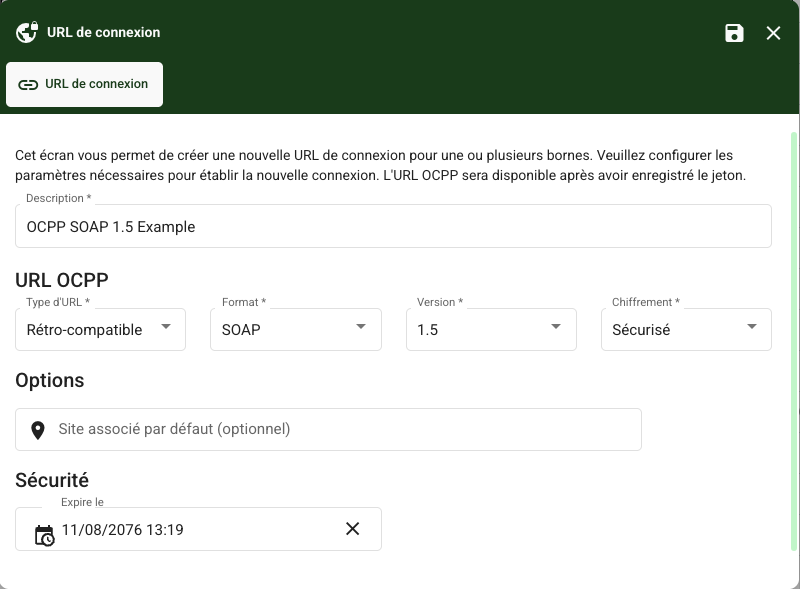
In SOAP format, the generated URL is always of the Backward compatible type: it carries your organisation identifier and the token in its parameters. The Cloud and Organisation types only apply to the JSON format.
Additional options
Default associated site — automatically attaches the charger to a site area on its first connection.
Expiry date — past this date, the token no longer allows a new charger to be registered.
Choosing between HTTPS and HTTP
Chargekeeper accepts both on the OCPP 1.5 endpoint.
- Secure (HTTPS) — always to be preferred.
- Non-secure (HTTP) — reserved for chargers whose TLS stack is too old to negotiate a modern HTTPS connection. Beware: the token then travels in clear text over the network.
Enter the URL in the charger
Once the token is saved, copy the generated URL. It looks like this:
https://ocpp-s.service-evse.com/OCPP15?TenantID=000000000000000000000001%26Token=0000000000000000000000ff
Paste the URL as is. The
%26between the two parameters is intentional: it is the encoded form of the&character, expected by some chargers that handle&poorly in a configuration file. Chargekeeper accepts both notations.
Enter it in the charger's OCPP server field. How to reach that field depends on the manufacturer: web portal, manufacturer application, local interface or configuration file.
Also check that the charger identifier is filled in — called Charge Box ID, ChargePoint Identity or Charge Point ID depending on the manufacturer. This is the name under which the charger will appear in the supervision.
Restart the charger so that it takes the new configuration into account.
Check the connection
On its first connection, the charger sends a Boot Notification message and registers automatically in Chargekeeper.
- Open the Chargers module — the charger must appear in the list
- Check the OCPP logs to confirm that the Boot Notification was received, then the Heartbeats
If the charger does not appear, see the Troubleshooting section below.
Specifics of OCPP 1.5 SOAP
Disconnection detection
In OCPP 1.6 JSON, the loss of the WebSocket connection immediately signals that a charger is offline. In 1.5 SOAP, that permanent connection does not exist: detection relies on the Heartbeat messages.
Chargekeeper asks the charger to send a Heartbeat every 60 seconds and considers the charger offline once it has missed three consecutive Heartbeats without sending any other message. An unplugged charger therefore shows as offline within the following minutes, not instantly.
Remote commands: an important limitation
⚠️ In OCPP 1.5 SOAP, downstream commands do not work with every charger. Check this charger by charger before committing to remote control features.
In OCPP 1.6 JSON, the charger keeps a connection permanently open: the supervision (the CPMS) sends its commands through it in both directions, and remote control always works.
In 1.5 SOAP, that connection does not exist. To send a command, the CPMS must call the charger, that is, open a connection to it itself. Two conditions must be met:
- The charger must announce its callback address. The standard expects it to indicate its own address — its endpoint — in each of its messages. Chargekeeper stores it and updates it at every exchange. But many 1.5 firmwares do not send it, or announce an unusable address.
- That address must be reachable from the internet. A charger behind an operator SIM card, a private IP address or a corporate firewall is not reachable, even if it announces its address correctly.
In practice, the second condition rules out most installations: most chargers sit on a private network, with no inbound port forwarding.
What always works
Everything the charger sends on its own, in the upstream direction: registration on first connection, connector statuses, session start and stop by badge, meter values, Heartbeat. Supervision, billing and reporting are therefore complete, even without downstream commands.
What may not work
Everything the CPMS sends to the charger: remote start and stop, restart, connector unlocking, reading and changing the configuration, availability change, reservation, firmware update, diagnostics retrieval.
How to know whether it works
After the first connection, run a simple command from the charger's page — a configuration read for instance, with no effect on operations. If it goes unanswered, the charger is not reachable downstream.
This is a limitation of the 1.5 protocol itself, not of Chargekeeper. If remote control is essential, the charger must move to OCPP 1.6 JSON.
Troubleshooting
The charger does not appear in the supervision
- Check that the URL was copied in full, down to the last character of the token
- Check that the charger identifier (Charge Box ID) is filled in
- Check the charger's network connectivity and that the outbound port is open (443 for HTTPS, 80 for HTTP)
- If the charger is old, try a Non-secure token: its TLS stack may be unable to negotiate a modern HTTPS connection
Some chargers alter the URL
Some firmwares automatically add a / character at the end of the configured URL, or even the charger identifier. Chargekeeper tolerates it and extracts the parameters correctly. No action is needed on your side.
The charger reports its sessions but does not answer commands
This is the expected behaviour when the charger does not announce a usable callback address, or is not reachable from the internet. See Remote commands above: the upstream direction remains complete, only remote control is affected.
Best practices
- Prefer OCPP 1.6 JSON as soon as the charger allows it; keep 1.5 for existing fleets
- Prefer secure encryption and only fall back to HTTP as a last resort
- Use one token per context (installation, test, production)
- Check the first connection in the OCPP logs before leaving the site
- Document the 1.5 chargers of the fleet: their remote commands depend on their network accessibility
