
Issues stopping charging sessions
In some cases, a charging session does not end correctly, which can prevent billing or leave the connector blocked. This page describes the common causes of these incidents and the recommended actions, whether you are a CPO (charge point operator) or an EMSP (e-mobility service provider).
CPO-side issues (charger connected to supervision)
Here the chargers are connected to Chargekeeper via the OCPP protocol, which allows supervision to monitor and control charging sessions.
1. The charger sent a StopTransaction but the connector stays blocked
- The charger did report a session stop (
StopTransaction), but the connector does not switch to the Available state. - In this case, supervision waits for the return to the "Available" state in order to fully close the session and compute the parking time (connection time after the end of charging).
Recommended action:
- From the Chargekeeper interface, identify the affected charger.
- Click on the connector, then use the option to force an update of the connector state.
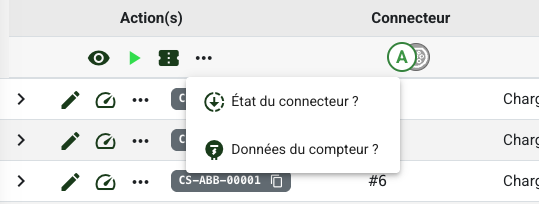
If the state still does not change:
- An administrator can decide to force the session to stop.
- In this case, supervision closes the session manually and the parking time is set to 0 seconds, in order to avoid any billing error.
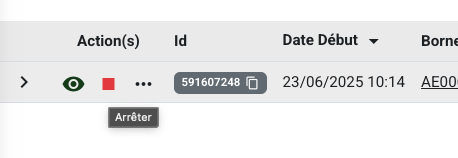
2. No stop signal was received (no StopTransaction)
- No more
MeterValuesare being transmitted (so no more consumption), but the charger never reports the end of the session. - This can be caused by a loss of network communication or a charger failure.
Two options:
-
Best practice: wait for a new session on the same connector. The new session will force the closure of the old one with an exact consumption, because the charger sends a new meter value.
-
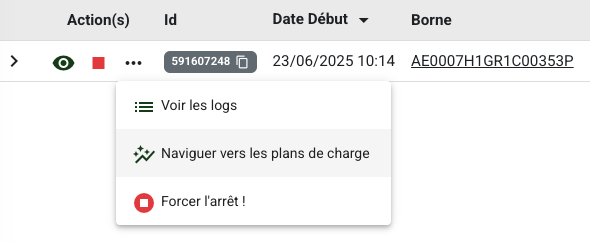
Administrators only: possibility to manually force the session to stop. Warning:
- The final consumption could be lower than the actual consumption.
3. Charger disconnected from supervision
- The charger is no longer reachable (network issue, hardware failure...).
- Forcing a stop is possible, but at the risk of losing consumption data.
- Recommendation:
- Reconnect the charger if possible.
- Upon reconnection, it will resend all past sessions, and the problematic session will be closed automatically.
4. Special cases
- Emergency stop triggered from the charger: interrupts the session abruptly.
- Roaming hub issues: some platforms such as Gireve may experience temporary unavailability. Contact the support of your roaming partners.
EMSP-side issues (service provider)
In a roaming scenario (via Gireve or through a direct connection), Chargekeeper acts as an EMSP.
1. The CPO does not transmit a StopTransaction or a CDR
- The session was properly started, but no end message or
ChargeDetailRecordis transmitted. - This can be caused by:
- A bug on the CPO side
- A faulty charger
- A network loss
Solution: force closure on the EMSP side
- Only administrators can force the stop.
- In this case:
- The Chargekeeper platform generates a virtual CDR locally, based on the available data.
- The session is marked as "non-billable" because it is not officially recognized as completed by the CPO.
Best practices
- Always check the OCPP logs of the session: this helps understand whether a
StopTransactionwas received, or whether there was a state failure. - Use the supervision tools to force or diagnose blocked sessions.
- Avoid manual actions that are too hasty: waiting for a reconnection can often resolve the session cleanly.
Need help?
Our support team is available to help you resolve blocked or improperly terminated sessions.
Feel free to contact us through your supervision interface.
