
Groups
Groups play a fundamental role in managing access and permissions, both for access to charging stations and for the use of the supervision tool. This page explains in detail the various aspects related to groups and how they impact the overall operation of your supervision solution.
Create a group
The group is the central element: it carries the role (supervision rights) and will be used in pricing to authorize charging.
- Go to the Groups module
- Click Create
Information
Fill in:
- Group name
- Owner company (optional but recommended)
- Select the group role: (Admin, Site-Admin, Site-Owner…)
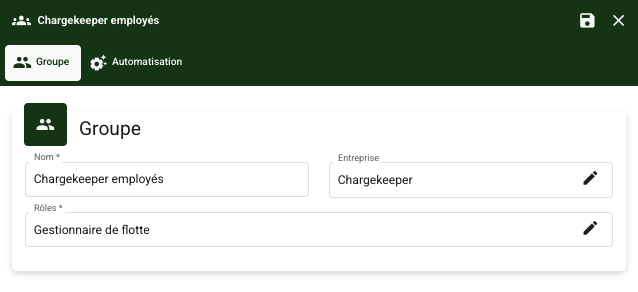
👉 For managing supervision access, you can refer to the dedicated article.
Automation
The affiliation mechanism concerns the attachment of users to a group.
What is affiliation for?
Affiliation makes it possible to automatically associate users with a group in order to simplify configuration & access.
How does affiliation work?
When creating or configuring a group, you can enable group affiliation automations based on:
- Badge
- The company associated with the user
- The domain name associated with the user
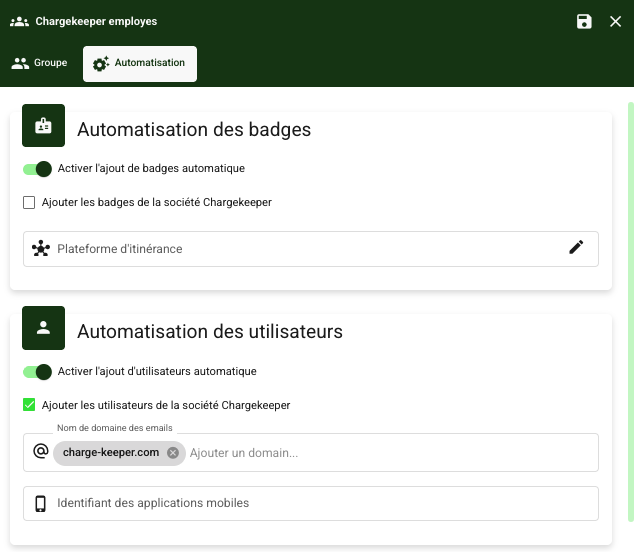
👉 For affiliating users with a company, you can refer to the dedicated article.
Roles
Groups are classified according to several predefined roles:
Chargers & charging
| Domain | Admin | Site Admin | Site Owner | Site Manager | Accountant | Sales | Basic |
|---|---|---|---|---|---|---|---|
| Charger | Full | Full | Read only | — | — | Read only | Read only |
| Connector | Full | Full | Read + write | — | — | Read only | Read + write |
| Charging profile | Full | Full | — | — | — | — | — |
| Smart-Charging | Read + write | — | — | — | — | — | — |
| Charger firmware | Read only | — | — | — | — | — | — |
Users & access
| Domain | Admin | Site Admin | Site Owner | Site Manager | Accountant | Sales | Basic |
|---|---|---|---|---|---|---|---|
| User | Full | Full | Read + write | Full | Read only | Read only | Read only |
| Group | Full | Full | Full | Read only | — | Read only | Read only |
| Role | Full | Full | Full | Full | Read only | Read only | — |
| Badge | Full | Full | Full | Full | — | Read only | Read only |
| Registration token | Full | Full | — | — | — | — | — |
| Access policy | Full | — | — | — | — | — | — |
Billing & finance
| Domain | Admin | Site Admin | Site Owner | Site Manager | Accountant | Sales | Basic |
|---|---|---|---|---|---|---|---|
| Billing | Read + write | — | — | — | — | — | — |
| Billing account | Full | — | — | — | Full | — | — |
| Billing transfer | Full | — | — | — | Read + write | — | Read only |
| Contract | Full | Read only | Read only | — | Full | — | — |
| Credit notes | Full | Full | Full | — | Full | — | — |
| Iso20022 (credit note) | Full | Read + write | Full | — | Full | — | — |
| Invoice | Full | Full | Read only | Read only | Full | Read only | Read only |
| Payment method | Full | — | — | — | — | — | Full |
Sessions & consumption
| Domain | Admin | Site Admin | Site Owner | Site Manager | Accountant | Sales | Basic |
|---|---|---|---|---|---|---|---|
| Session | Full | Read + write | Read + write | Read + write | Read only | Read + write | Read + write |
| Consumption | Full | Full | Full | Full | Read only | Full | Full |
| Report | Read only | Read only | Read only | Read only | Read only | Read only | — |
Sites & infrastructure
| Domain | Admin | Site Admin | Site Owner | Site Manager | Accountant | Sales | Basic |
|---|---|---|---|---|---|---|---|
| Zone | Full | Full | Read only | Read + write | Read only | Read only | Read only |
| Energy resource | Full | Read only | — | — | — | Read only | — |
| QR Code | Full | Full | Read only | Read only | — | Read only | Read only |
| Connection | Full | — | — | — | — | — | Full |
| Source | Read only | Read only | — | Read only | — | Read only | — |
Vehicles
| Domain | Admin | Site Admin | Site Owner | Site Manager | Accountant | Sales | Basic |
|---|---|---|---|---|---|---|---|
| Vehicle | Full | Full | Full | Full | — | Read only | Full |
| Vehicle catalog | Read only | Read only | Read only | Read only | — | Read only | Read only |
Roaming & integrations
| Domain | Admin | Site Admin | Site Owner | Site Manager | Accountant | Sales | Basic |
|---|---|---|---|---|---|---|---|
| Roaming (OCPI) | Full | — | — | — | — | — | — |
| Roaming (Hubject) | Full | — | — | — | — | — | — |
| Advenir | Full | Read only | Read only | — | — | Read only | — |
Administration
| Domain | Admin | Site Admin | Site Owner | Site Manager | Accountant | Sales | Basic |
|---|---|---|---|---|---|---|---|
| Dashboard | Read only | Read only | Read only | Read only | Read only | Read only | — |
| Pricing | Full | Full | Read only | Read only | Read only | Read only | — |
| Logs | Full | Full | — | — | — | Full | — |
| Notification | Read + write | — | — | — | — | — | Read + write |
| Settings | Full | — | — | — | — | — | Read only |
| Email configuration | Full | — | — | — | — | — | — |
| Organization | Full | Read only | Read only | Read only | Read only | Read only | Read only |
