
B2B Contracts
Chargekeeper's B2B contract management module lets you model and manage billing flows between two legal entities (companies). When a contract is active and covers the current period, invoices and credit notes are generated automatically and can be sent to customers.
Steps to create a contract
Creating a contract is divided into 5 steps, allowing you to precisely configure the contract parameters and the associated services:
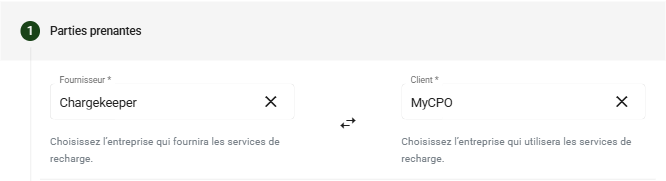
1. Defining the stakeholders
In this first step, you define the two parties involved in the contract:
- Supplier: The company that provides the charging services.
- Customer: The company that will use the charging services.
2. Contract configuration
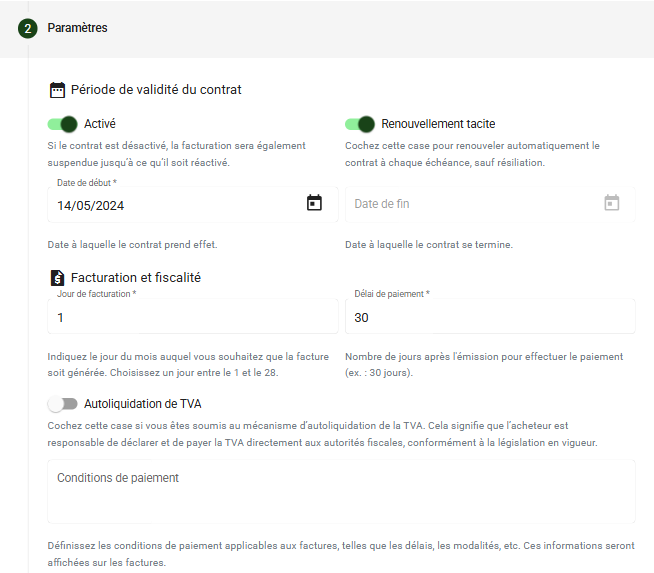
This step lets you configure the essential parameters of the contract:
Validity period:
- Activated: The contract is active in the supervision.
- Start date and end date of the contract (end date optional in the case of tacit renewal).
- Tacit renewal option to automatically extend the contract at each expiry.
Billing and taxation:
- Billing day (1 to 28 of the month).
- Payment term (e.g. 30 days after issuance).
- VAT reverse charge option if applicable.
- Payment terms displayed on the invoices.
Automation rules:
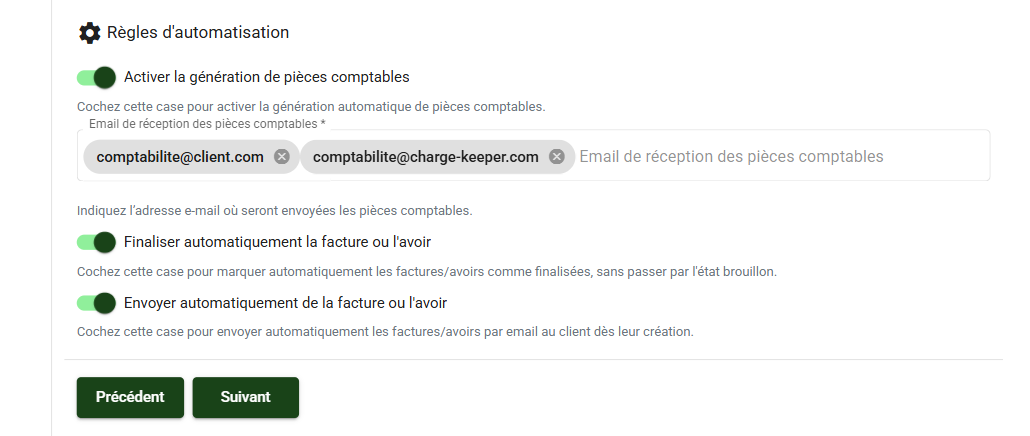
Enable automatic invoice generation: This option allows documents (invoice/credit note) to be generated automatically or manually.
E-mail address(es) for receiving accounting documents: Providing the e-mail address of the customer's accounting department allows the supervision to send the accounting documents. Several addresses can be added to the contract to receive the accounting documents.
Automatically finalize the invoice or credit note: This option generates a document with the "Open" status. If it is not enabled, the document will have the "Draft" status (with the option to delete it), allowing you to generate and check the accounting documents before validating them and sending them to the customer.
Automatically send the invoice or credit note: This option enables the automatic generation and sending of accounting documents to the customer (by default the system generates the invoice and/or credit note but does not send it automatically).
3. Defining the charging services
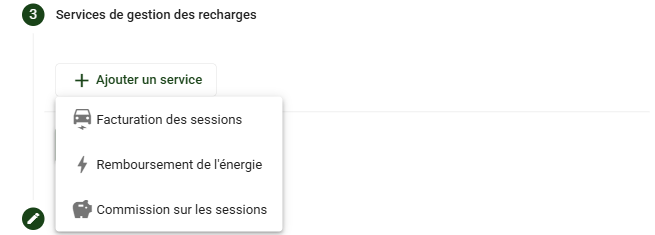
In this step, the services related to electric charging are added to the contract. The available services are:
- Session billing: Periodic billing of all charging sessions.
- Energy refund: Refund of the kWh consumed according to the defined conditions.
- Session commission: Application of a commission on each charging session.
Note: The energy refund and commission services aim to refund the sessions to the customer. These two services cannot be combined, otherwise an overpayment credit note will be generated for the customer.
3.1 Session billing
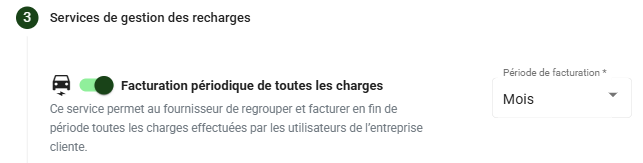
Activating session billing allows a grouped invoice to be issued to the customer according to the chosen frequency (monthly, quarterly, annual) for all priced sessions.
This service is designed to fit an agreement between the supplier and the customer, identified to perform charging sessions and be billed on a grouped basis.
3.2 Energy refund
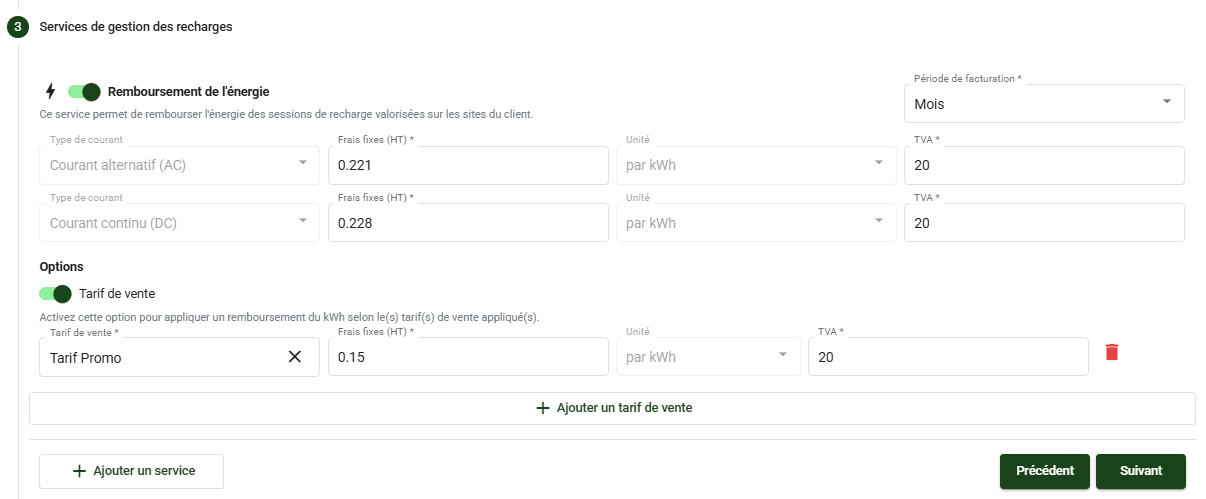
Activating the refund allows a credit note to be issued to the customer on all priced sessions of the defined period, by applying a fixed fee per kWh.
The fixed refund fee is defined according to the type of current: AC or DC. If you do not make a distinction, enter the same amount for AC and DC.
Example session:
• Amount excl. tax: €27
• kWh consumption: 66 kWh
• Refunded kWh price excl. tax: €0.25
• Calculation: 0.25 * 66 = 16.50 excl. tax
A credit note is issued in favor of the customer for the sum of €16.50 excl. tax (The supplier keeps the sum of €10.5 excl. tax)
An option, called "Sale price", is available to perform a different energy refund according to the sale price applied to the session. By activating this option, you refine your refunds by adapting them to the sale price actually applied to each session. This option is particularly useful in the case of promotional prices; this feature lets you define a specific refund amount for each price.
💡 If several prices are applied to the same session, you can set a refund amount per price; it will be split by sale price in order to apply the energy refund corresponding to the consumption linked to the sale price.
Otherwise, the default refund amounts (AC and DC) will be used.
An option, called "Purchase price", is available to perform an energy refund according to the energy supplier's pricing conditions.
👉 For more details, see the dedicated article on managing the energy refund based on the purchase price.
3.3 Session commission
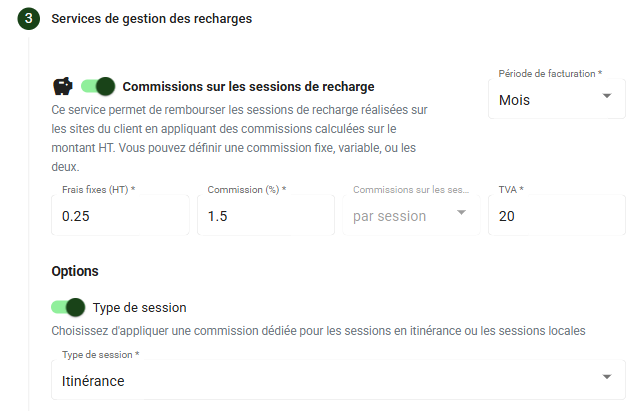
Applying a commission allows a credit note to be issued on all priced sessions, both local and roaming, while retaining a commission.
An option, called "Roaming sessions", is available to refund priced roaming sessions by applying a dedicated commission.
A commission can be applied in three ways:
- A fixed fee per session,
- A percentage applied to the transaction amount,
- A combination of both (fixed fee + variable).
The commission is calculated and applied to the individual amount of each session. Then, the total of the commissions retained is summed and deducted from the amount owed to the customer for the period concerned.
[Case 1] Commission with a fixed fee:
• Amount excl. tax: €27
• Fixed fee: €0.50
A credit note is issued in favor of the customer for the sum of €26.50 excl. tax (The supplier keeps the sum of €0.5 excl. tax)
[Case 2] Commission with a variable:
• Amount excl. tax: €27
• Variable: 1%
A credit note is issued in favor of the customer for the sum of €26.73 excl. tax (The supplier keeps the sum of €0.27 excl. tax)
[Case 3] Commission with a fixed fee + variable:
• Amount excl. tax: €27
• Fixed fee: €0.50
• Variable: 1%
A credit note is issued in favor of the customer for the sum of €26.23 excl. tax (The supplier keeps the sum of €0.77 excl. tax)
Note:
- Whether fixed fees are applied or not, the commission in % is always calculated on the total amount excl. tax of the session, and not on the amount remaining after deduction of the fixed fees.
- If the amount of the commissions is greater than the amount excl. tax of the session, the commission is then capped at the amount of the session itself.
3.4 EMSP billing
Activating this clause allows an EMSP to be billed for all sessions performed during the period, based on the pricing transmitted in the CDR.
Pre-billing (D-7 to the billing date)
- Automatic sending of an email to the EMSP with an XLS export of the sessions to be billed
- 7-day window to dispute with the CPO
Billing (date set in the contract - min 8th day of the month)
- Sending of an email to the EMSP including the XLS export + invoice for the sessions
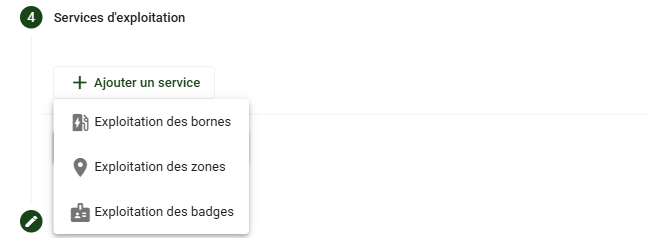
4. Defining the operation services
This section lets you add services related to the operation of the charging infrastructure, such as:
- Charge point operation: Management and monitoring of the charging stations.
- Zone operation: Management of the charging zones.
- Badge operation: Management of the RFID badges used for charging.
4.1 Charge point operation
Charge point operation can be billed to the customer in different ways and according to the chosen unit:
- Charging station
- Charge point
- Connector
Several options are available to refine the billing:
Bill on a prorata basis: allows an operation price to be applied on a prorata basis of the charging station's creation date relative to the billed period.
Alternating current AC: allows a dedicated operation price to be applied to all chosen units (used or not) if they are of the alternating current type.
Direct current DC: allows an operation price to be applied to all chosen units (used or not) if they are of the direct current type.
Charging stations/Charge points in service: allows an operation price to be applied only to the chosen units that are 'In service' on the billing day.
Connected to roaming: allows a specific operation price to be applied to all chosen units that are offered in roaming.
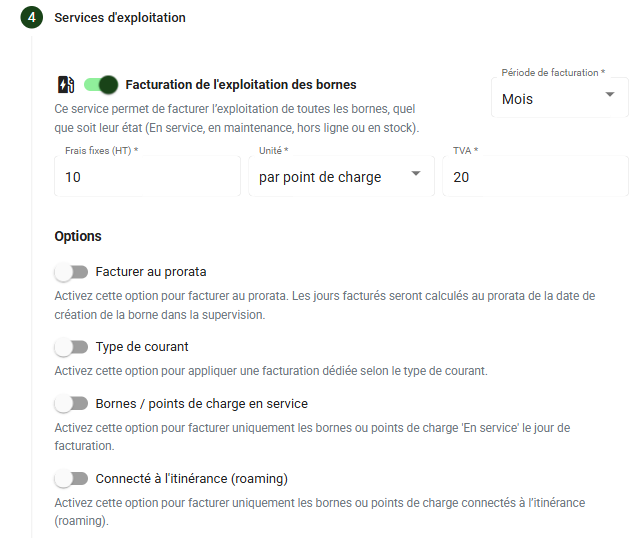
Combining options is possible! For example, bill €5 for active AC charge points and €10 for active DC charge points.
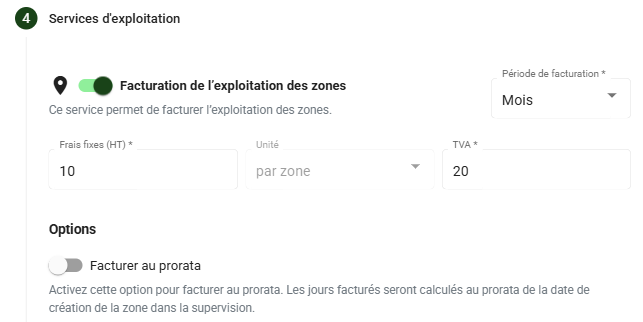
4.2 Zone operation
Zone operation allows an invoice to be issued for the zone(s) associated with the customer. This will also be calculated on a prorata basis (according to the zone's creation date relative to the billed period).
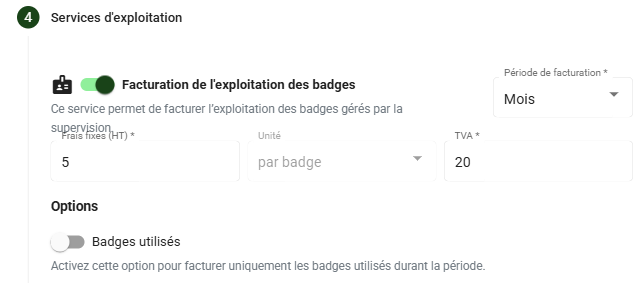
4.3 Badge operation
Badge operation allows an invoice to be issued for the badge(s) associated with the customer.
An option, called 'Used badges', is available to bill only the badges associated with the customer's charging sessions during the chosen billing period.
Applying the badge operation price can be combined, to bill on the one hand the badges associated with the customer and on the other hand the badges used during the billing period with different pricing.
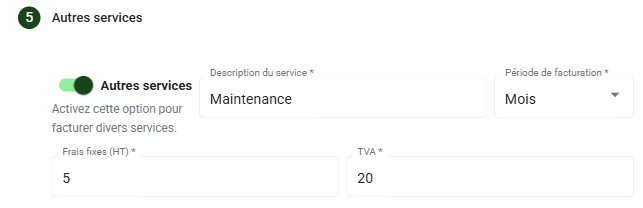
5. Adding other services
Adding other services lets you include specific services billed periodically:
- Service description.
- Fixed fees (excl. tax).
- Applicable VAT rate.
- Frequency (Monthly, Quarterly, Annual).
Managing invoices and credit notes
When a contract is active, Chargekeeper automatically generates invoices for the services billed to the customer and credit notes in the case where the supplier must refund the customer (e.g. refund of kWh).
The credit notes related to energy refunds or commissions sent to the customer are accompanied by a CSV file containing the detailed list of charging sessions to make accounting verification easier.
Manual invoice generation
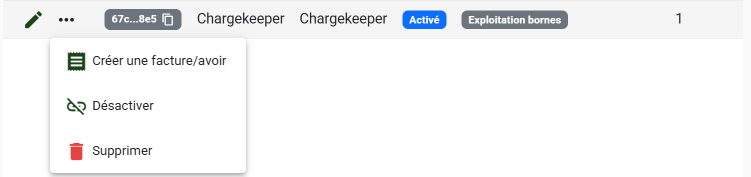
From the contract list, it is possible to manually generate invoices or credit notes, for example:
- If the contract was created after its actual start date, requiring a past period to be billed.
- If charging sessions were missing during the automatic generation (e.g. charging station offline).
Managing B2B invoices
The invoices generated within the framework of B2B contracts are accessible from the Invoices area of the supervision. The possible actions include:
- Update the status: Cancelled, marked as paid, deleted...
- Send the invoice by e-mail to the customer.
- Regenerate the PDF of the invoice.
- Send a payment reminder in the event of non-payment.
Numbering of accounting documents
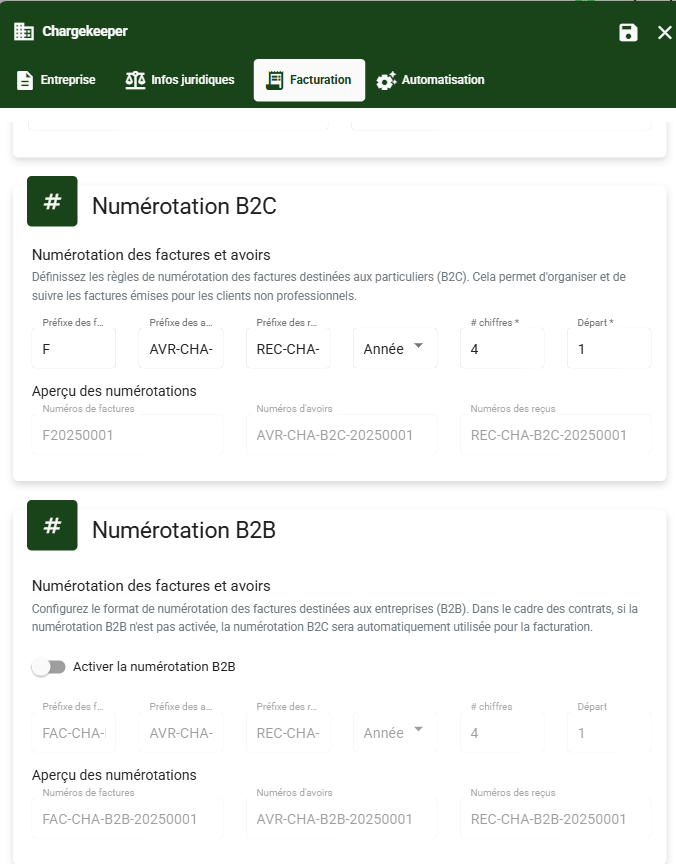
From the Company module, the supplier can precisely define the numbering rules for accounting documents for B2C and B2B.
Note: If automatic B2B numbering has not been enabled, the accounting documents of B2B contracts will by default take the B2C numbering rules.
Structure and elements of a service
Each service in a contract is defined by:
- Service type (see the service types section).
- Fixed price excl. tax.
- Unit (kWh, charging station, badge...).
- Applicable VAT.
- Commission (%), applicable for the commission system on charging sessions.
- Billing options
Billing and frequency
A contract can define different billing frequencies:
- Monthly: Billing at the end of each month.
- Quarterly: Billing at the end of each quarter.
- Annual: Billing once a year.
Example: An invoice generated for the month of April may contain the charging sessions of the month of March and the charge point operation for the first quarter.
Making bank transfers
After creating the credit notes, you can generate an XML file to automate the bank transfers on your banking platform. For more information, go to the support page.
To enable this feature, please contact the Chargekeeper sales department at: sales@charge-keeper.com.
Support
For any assistance regarding the management of B2B contracts, contact our support team at support@charge-keeper.com.
