
Supervision access
By default, a user does not have access to the supervision platform. All new users are automatically assigned to a system group called "Default", which only allows the use of the mobile app.
This documentation explains how to grant access rights to a manager so they can access the supervision.
Access to Chargekeeper supervision is controlled by the groups and the roles associated with them. Each user automatically inherits their rights based on the groups they belong to.
This mechanism lets you restrict access to features, data and visible scopes, while keeping supervision centralised and secure. You can restrict access to specific companies and zones.
Configure supervision access
- Go to the Technical Settings > Supervision access menu.
- Click Create
- Define the access:
- Allowed company/companies.
- Accessible zone(s).
- Save.
Example: All users assigned to the 'Chargekeeper employees' group can thus log in to the supervision and view all the data related to every zone associated with the Chargekeeper company only. Data from other companies/zones is not accessible to these users.
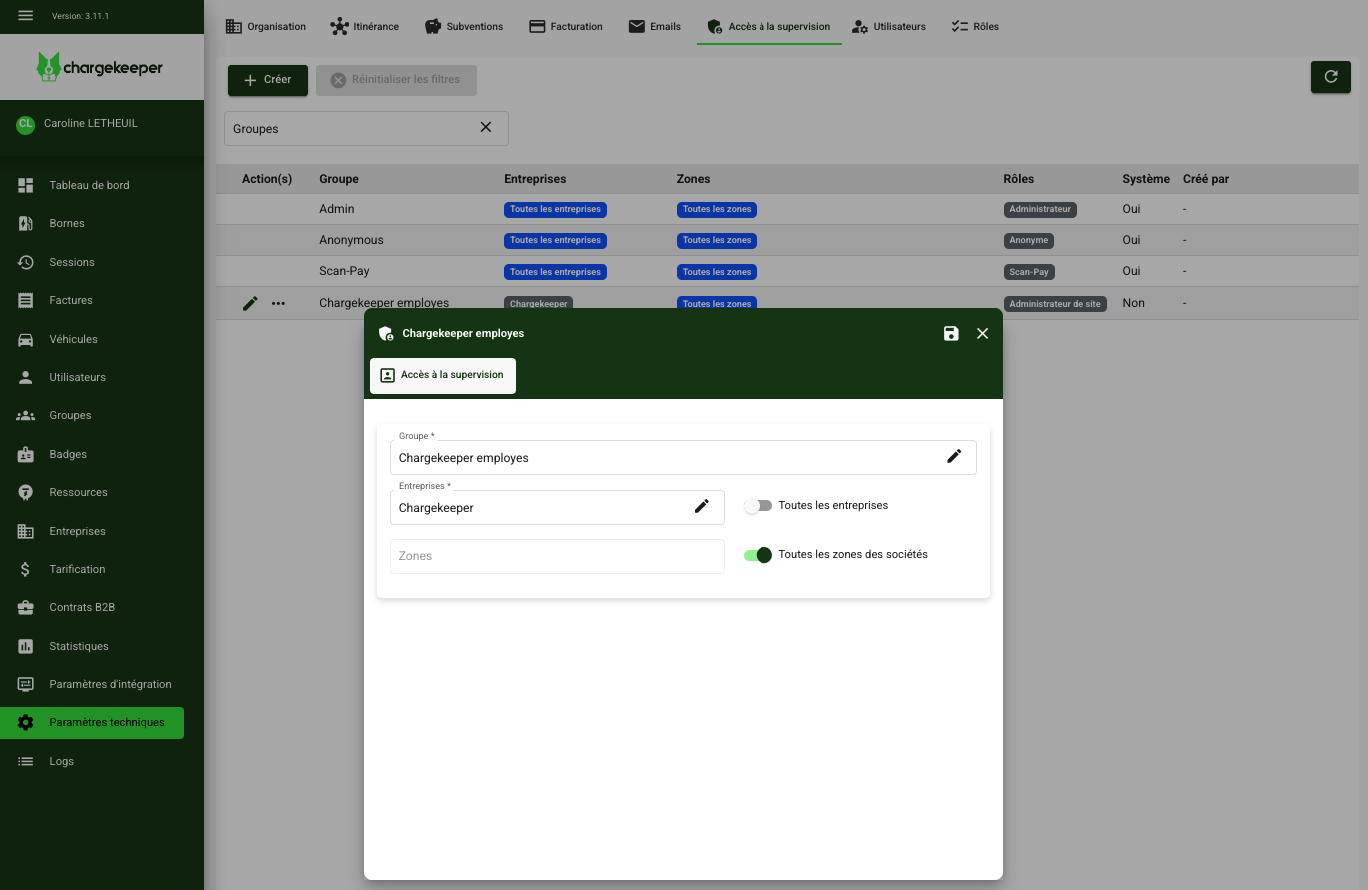
Once the changes are made:
- Ask the user to reconnect to the supervision.
- Check that they can only access the items defined in their group.
- Adjust the permissions if necessary.
